
| ASUS today announced a range of motherboards with full support for the Intel Sandy Bridge processors. The P8P67 and P8H67 line of motherboards are based on the Intel P67 and H67 chipsets. The new motherboards introduce DIGI+ VRM technology. The ASUS exclusive feature offers digital CPU voltage regulation for improved reliability, stability and performance. The ASUS P8P67 and the Sabertooth P67 The new motherboards also feature Dual Intelligent Processors 2 technology, which consists of twin embedded co-processors that ensure optimized energy consumption and enhanced performance controls, which are not available in other motherboards. Other exclusive features include mouse controlled EFI BIOS interface as well a bluetooth management application called BT! GO. “The new ASUS motherboards based on the P67 and H67 chipsets employ several new features like DIGI+VRM, DIP2 , EFI BIOS and BT GO!, to give users increased functionality and performance. We have brought an extensive portfolio of products based on this new platform across various price segments to cater to all users - from casual to high end - so that everyone can fully utilize the benefits of this new platform. We are confident that users looking at migrating to the new P67 and H67 chipsets will find these new motherboards from ASUS best suited for their needs,” commented Mr. Vinay Shetty – Country Head – Component Business, ASUS (India) about the launch of the new motherboards. ASUS has a total of twelve motherboards under the P8P67 and P8H67 line, the price and model numbers are as follows:
|
Showing posts with label MotherBoards. Show all posts
Showing posts with label MotherBoards. Show all posts

ZOTAC announces a New Range of ION-ITX Motherboards-UPDATED
ZOTAC today announced an update to its award winning ION-ITX range of motherboards. The new range includes the ION-ITX R, ION-ITX S and ION-ITX T series and conforms to the mini-ITX form factor. They are powered by an Intel Dual-Core 1.8GHz processor as well as NVIDIA’s Next-Generation NVIDIA ION GPU with 512MB DDR3 memory. Other features include USB 3.0, Dual-DVI outputs along with inbuilt Wi-Fi.

Perfect for small HTPC builds
For a complete list of the specifications, take a look below
Click to enlarge
“ZOTAC continues to update our award-winning NVIDIA ION platforms. Our latest ION-ITX R, S and T series introduce Next-Generation NVIDIA� ION graphics and available USB 3.0 technology to our NVIDIA ION product lineup to let DIY enthusiasts assemble their ideal small form factor system with the latest technologies and features,” said Carsten Berger, marketing director, ZOTAC� International.While the prices have not been mentioned at this time, be sure to check back for an update as soon as we have information.
Update:We have received the prices for the Motherboards and they are as follows:
ION-ITX-R : Rs. 9,555
ION-ITX-S : Rs.� 10,333
ION-ITX-T : Rs. 11,999
Update:We have received the prices for the Motherboards and they are as follows:
ION-ITX-R : Rs. 9,555
ION-ITX-S : Rs.� 10,333
ION-ITX-T : Rs. 11,999
Take a put look at Gigabyte’s G1.Assassin 2 board
While there is no recognized time of Intel’s approaching Exotic Fill E cpus, brands are displaying off motherboards using the X79 chipset. Gb is one of the key system panel brands and their G1 line group of fan training designs will also have an added associate to the household soon. Their G1.Assassin 2 line of motherboards will use the X79 chipset and should be directed at the fan and player visitors. Gb has found off a few shots of their approaching system panel. It’s hard to know all details of the panel but some of the apparent ones are the truth that the system panel will have the Bigfoot Fantastic E2100 NIC and Creative’s X-Fi music brand. Being a high-end enthusiast-class system panel, in addition, there's the pretty heatsinks placed all around the system panel, such as one that's in the appearance of a gun.
 All this quick increase in details on the X79 system panel indicates that the recognized start of Intel’s new Exotic Fill E cpus might be sometime in mid-November. A lot of cpus will be presented - mostly 6-core, 12-threaded ones. Costs of these designs is likely to array between $300 and $999 (approximately Rs. 13,500 to Rs. 45,000). No further details or prices details on the Gb G1.Assassin 2 system panel has been introduced yet.
To examine out more pictures brain, over to the G1.Assassin 2 collection.

To examine out more pictures brain, over to the G1.Assassin 2 collection.
Review of Asus Maximus IV GENE-Z Motherboard
We have already made the V-Pro Asus P8Z68 rotating mother and came away impressed with its performance. Although it was a bit 'on the expensive side for Micro-ATX motherboard features are available to pay for it. Today we look at the Maximus IV GENE-Z motherboard, the second is based on the Z68 chipset, but this is their Republic of Gamers (ROG), which means that line-up is aimed at enthusiasts who like to experiment and develop each setting down to the last detail.
Design and Layout
The GENE-Z may be a micro-ATX motherboard, but Asus has crammed every inch of PCB components. As is their ROG line, we have a striking black PCB with Red PCI expansion slots. There is even a little smaller than the standard micro-ATX which means that fewer PCI slots. The rear I / O ports include PS2 combo port, 8 USB 2.0 ports, two USB 3.0 ports, Gigabit LAN, audio optical output SPDIF, HDMI 8-channel audio and onboard SupremeFX X-Fi 2. CMOS reset button is also located here and is backlit easy to see in the dark.
 This motherboard supports all Socket 1155 processors from Intel and is reinforced with a design layout of 8-phase CPU power supply with four stages to iGPU. There are even power two-stage design for RAM. With multiple phases to ensure power delivery / all points of the power source is removed before they reach components. These VRMs are cooled by a radiator squat in the area of the CPU. Due to the small size of the board, installing the Intel stock cooler was a bit difficult because there are a lot of capacitors in the way. Not much room to mess up with your fingers. The memory slots, touching the graphics card, but fortunately, the clips are placed to the side which facilitates the exchange of RAM, once installed.
 Expansion slots include one PCIe 2.0 x16 and one x8 slot. There are no PCIe x1 slots, and legacy PCI slots, one PCIe 2.0 x4. There are a total of six SATA ports natively support the chipset Z68. Four SATA II, III, the rest are SATA. Asus has also two JMicron eSATA ports on the back I / O panel. What distinguishes this platform in addition to their standard offerings are passionate about class features added by backlit "Start" and "Reset" button. These are useful for the environment overclockers certainly appreciate the open bed. Debug LEDs give you real-time system status and forty something wrong, you can easily adapt the code of a manual to know exactly what is wrong. Despite its small size, the Asus has also managed to cram four PWM fan headers, other than the CPU fan.
In general, the PCB is well built and not long after flex install all components. The black lacquer finish against the expansion slots is definitely sexy red and go very well with glass. In the quest to save space, Maximus IV feels a little cramped in the construction of the platform and the number of expansion slots may be a delay of a few.
Features
The UEFI BIOS has undergone a facelift and has a red background ROG theme. The play + VRM option gives you much more control over how power should be supplied to the elements and you can adjust the phase VCore VDRAM, etc. You can either choose one of the predefined profiles (regular, high, extreme) or manually adjust it yourself. You can even take a screenshot of the page of the BIOS, you're just pressing F12 if you want to send parameters to a friend or just for your file. RAM slots can support speeds of up to 2133MHz memory which means that there is much room for overclocking. Tools include BIOS EZ Flash 2 to update the BIOS, SPD Info gives you all the details of your memory modules, Asus OC Profile save up to eight profiles allows you to quickly switch to them, and then click the button Go, which lets you can set a profile and activate it overclock by pressing the physical button on the board.
 Perhaps the most unique feature is the ROG Connect allows you to monitor the system for the laptop. Once installed the ROG Connect and Connect Plus key on the desktop and a laptop, you only need to hit the top of the motherboard so that it is. Then connect a laptop and desktop using the supplied cable, and through the utility, the RC TweakIt you can monitor and adjust settings on the local computer. RCPoster shows the status of the local system during the POST, as well. All these data can be monitored and recorded.
Package contents are bands, labels, SATA cables, six SATA cables, SLI bridge, Q-connectors on the front panel headers, I / O shield, ROG Connect the cable, drivers, manual and a nice case characters. Unlike other high-end cards, you will not get the Bluetooth GENE-Z.
 Test specifications of the device
Processor: Intel Core i7-2600K CPU@3.40 GHz
Motherboard: Asus P8Z68 Pro-V
Memory: Corsair Dominator GT DDR3 6 GB (3 x 2 GB)
Hard Disk: WD Velociraptor 300 GB
GPU: AMD Radeon HD 6970
PSU: Cooler Master Silent Pro 1000W
Performance
We setup Maximus IV GENE-Z motherboard with a new installation of Windows 7 Ultimate. All drivers have been updated to the latest version too. We have not updated the BIOS because we do not really feel the need so everything was rock solid.
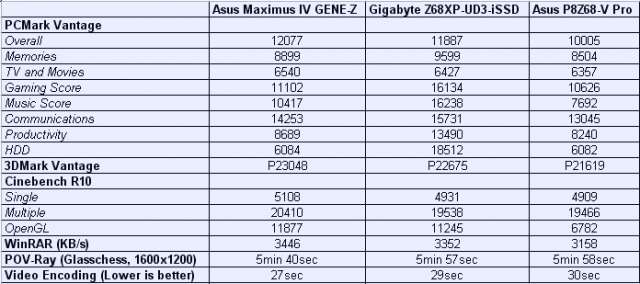
Gigabyte Z68XP-UD3-iSSD did better "productivity" and "HDD" PCMark Vantage tests, due to the solid-state drive from Intel on board. In other tests, however, GENE-Z knows how to step before his younger brother, P8Z68 Pro-V. P8Z68 may look behind the graphical benchmark, and that when we tested the use of the 570 GTX So, in addition to that, the rest of the results of disk memory, CPU and hard can be directly compared with Massimo IV.
 Asus bundles along a number of software packages that are available through a single interface, AI Suite II. The DIGI + VRM tool allows you to adjust the VRM voltage and frequency modulation directly from the OS without having to go through the BIOS. It also allows the load-line calibration limit of the maximum voltage of the processor when overclocking. TurboV Evo is an overclocking tools like AMD Overdrive. You can either do it manually or let the software do it for you. In automatic mode, the program tends to stumble tensions, even when not in use, it is advisable to do it manually.
 EPU makes a comeback as well, so you can invest in that state your computer run to select the performance, quiet, comfort, safety and energy saving. Each of these settings can be further customized to your liking. Fan Xpert you can control the speed of case fans, but remember, this only works if the fans have the PWM function, which usually come with four-pin connector instead of the three surfaces.
Verdict
The Asus Maximus IV GENE-Z mother is priced at Rs.13, 110 which is more than P8Z68 Pro-V motherboard from the same company. We understand it is designed for enthusiasts and overclockers, but there is away from the fact that it is quite expensive for a micro-ATX motherboard. If you are into overclocking and benchmarking competitive, the Z68 is a strong candidate for this purpose. But for the average user, most of these features will not be used and also the motherboard does not have enough expansion slots to be sustainable.
Design and Layout
The GENE-Z may be a micro-ATX motherboard, but Asus has crammed every inch of PCB components. As is their ROG line, we have a striking black PCB with Red PCI expansion slots. There is even a little smaller than the standard micro-ATX which means that fewer PCI slots. The rear I / O ports include PS2 combo port, 8 USB 2.0 ports, two USB 3.0 ports, Gigabit LAN, audio optical output SPDIF, HDMI 8-channel audio and onboard SupremeFX X-Fi 2. CMOS reset button is also located here and is backlit easy to see in the dark.


In general, the PCB is well built and not long after flex install all components. The black lacquer finish against the expansion slots is definitely sexy red and go very well with glass. In the quest to save space, Maximus IV feels a little cramped in the construction of the platform and the number of expansion slots may be a delay of a few.
Features
The UEFI BIOS has undergone a facelift and has a red background ROG theme. The play + VRM option gives you much more control over how power should be supplied to the elements and you can adjust the phase VCore VDRAM, etc. You can either choose one of the predefined profiles (regular, high, extreme) or manually adjust it yourself. You can even take a screenshot of the page of the BIOS, you're just pressing F12 if you want to send parameters to a friend or just for your file. RAM slots can support speeds of up to 2133MHz memory which means that there is much room for overclocking. Tools include BIOS EZ Flash 2 to update the BIOS, SPD Info gives you all the details of your memory modules, Asus OC Profile save up to eight profiles allows you to quickly switch to them, and then click the button Go, which lets you can set a profile and activate it overclock by pressing the physical button on the board.

Package contents are bands, labels, SATA cables, six SATA cables, SLI bridge, Q-connectors on the front panel headers, I / O shield, ROG Connect the cable, drivers, manual and a nice case characters. Unlike other high-end cards, you will not get the Bluetooth GENE-Z.

Processor: Intel Core i7-2600K CPU@3.40 GHz
Motherboard: Asus P8Z68 Pro-V
Memory: Corsair Dominator GT DDR3 6 GB (3 x 2 GB)
Hard Disk: WD Velociraptor 300 GB
GPU: AMD Radeon HD 6970
PSU: Cooler Master Silent Pro 1000W
Performance
We setup Maximus IV GENE-Z motherboard with a new installation of Windows 7 Ultimate. All drivers have been updated to the latest version too. We have not updated the BIOS because we do not really feel the need so everything was rock solid.
Gigabyte Z68XP-UD3-iSSD did better "productivity" and "HDD" PCMark Vantage tests, due to the solid-state drive from Intel on board. In other tests, however, GENE-Z knows how to step before his younger brother, P8Z68 Pro-V. P8Z68 may look behind the graphical benchmark, and that when we tested the use of the 570 GTX So, in addition to that, the rest of the results of disk memory, CPU and hard can be directly compared with Massimo IV.


Verdict
The Asus Maximus IV GENE-Z mother is priced at Rs.13, 110 which is more than P8Z68 Pro-V motherboard from the same company. We understand it is designed for enthusiasts and overclockers, but there is away from the fact that it is quite expensive for a micro-ATX motherboard. If you are into overclocking and benchmarking competitive, the Z68 is a strong candidate for this purpose. But for the average user, most of these features will not be used and also the motherboard does not have enough expansion slots to be sustainable.
Gigabyte GA-A75 - D3H LIanos Motherboard
AMD Llanos has assuredly hit the bazaar and the new A75 and A55 chipsets accept started trickling in from all above motherboard manufacturers. We’ve already apparent the Asus F1A75M-PRO in action, and now it’s Gigabyte's turn. The GA-A75-D3H is a boilerplate motherboard with their own flavour befuddled in like DDR3 anamnesis abutment upto 2400MHz, bifold BIOS and abundant more. First, let’s accept a attending at the architecture and blueprint of the board.
Design and Layout
The GA-A75-D3H is a abounding ATX motherboard, which agency there is added amplitude for the amplification slots and added components. There's affluence of allowance about the CPU area, in case you ambition to install a beyond third affair heatsink. Coming to the rear connectors, we accept four USB 3.0 ports, which are natively supported. Display connectors cover VGA, HDMI and a Dual-link DVI adapter for hooking up a 30-inch adviser to the onboard graphics.


Design and Layout
The GA-A75-D3H is a abounding ATX motherboard, which agency there is added amplitude for the amplification slots and added components. There's affluence of allowance about the CPU area, in case you ambition to install a beyond third affair heatsink. Coming to the rear connectors, we accept four USB 3.0 ports, which are natively supported. Display connectors cover VGA, HDMI and a Dual-link DVI adapter for hooking up a 30-inch adviser to the onboard graphics.
Good set of connectors
One affair to agenda is that if you accredit dual-link, you can't use any of the added ports. Added connectors cover optical-out, LAN jack, ESATA, USB 2.0 ports and Realtek ALC889 with 7.1 approach support.
Good layout and design
The four anamnesis slots are placed at a acceptable ambit from the PCIE slot, so they don't get in the way afterwards installing the cartoon card. There are a absolute of 5 SATA III connectors onboard forth with one ESATA in the rear panel. In agreement of expansion, we accept two x16 PCIE connectors with CrossFireX support, forth with three PCI slots and two PCIE x1 slots. Gigabyte has gone with their brand dejected PCB and overall, I didn’t accept any issues with body superior of the motherboard.
Features
Since this is not a high-end board, it alone has Gigabyte's Ultra Durable 2 affection set, which includes solid accompaniment capacitors and Lower RDS MOSFETs for bargain ability burning and heat. We aswell accept On/Off charging, Dolby Home Theatre and Dual BIOS support. A new affection added is an alone agglutinate for anniversary USB port, so that if one fails, you'll still be able to use the added ports.
The Southbridge gets hot pretty quickly
Gigabyte hasn’t acclimated a UEFI BIOS like Asus, which agency you still accept to accord with the dejected awning and keyboard. Their ‘Touch BIOS’ is alone accessible for the Intel Sandy Bridge belvedere as of now. Basic overclocking options are present beneath the M.I.T submenu. The blow of the options are appealing accepted beyond all Gigabyte motherboards. There are a accomplished agglomeration of software utilities like EasyTune 6 for ecology and tweaking settings of the motherboard and CPU. Dynamic Energy Saver 2 is aswell present and so is Smart Recovery 2 and AutoGreen. All the drivers and utilities are provided on the disk. The array includes the user manual, four SATA cables and an I/O absorber plate
Testbench
Processor: AMD A8-3850 APU
Motherboard: Gigabyte GA-A75-D3H
Memory: Kingston HyperX DDR3 @1600MHz (2x 2GB)
Hard drive: WD Velociraptor 300 GB
GPU: Onboard HD 6550D/ HD 6670 CF
PSU: Cooler Master Silent Pro 1000W
Performance
The motherboard came with aboriginal afterlight BIOS (F1), which was absolutely unstable. After a quick beam to the F2 BIOS, the motherboard was a lot added abiding with no accidental freezing or abolition issues. I did accept one big problem, though, the anamnesis artlessly banned to run at its rated 1600MHz, which was a non-issue for the Asus lath I tested. No amount what I tried, I kept accepting an absurdity adage the lath bootless to cossack at the defined settings and that the anamnesis would be displace to 1333MHz. Due to this, you’ll apprehension that the array are a bit lower compared to the Asus lath abnormally 3DMark and PCMark Vantage.
 The performance is hampered a bit by the lower memory speed Under accustomed operations, I noticed the Southbridge or as AMD calls it the Fusion Controller Hub (FCH) tends to get absolutely hot appealing fast. The dent is covered by a baby aluminium heatsink but it doesn’t accept any fins so the calefaction is not blown absolutely well. The acceptable allowance of USB 3.0 ports is a acceptable change and you accept added USB 2.0 headers on the motherboard should you feel the charge to expand. Back this is a account board, you won’t acquisition any alter LEDs or concrete ability and displace buttons. Verdict Gigabyte has priced the GA-A75-D3H at Rs. 7,020, forth with a three year warranty. This appraisement is actual agnate to the Asus FM1A75-M PRO, which is a brace hundred added for an m-ATX board. Now, commonly I would advance you aces a abounding ATX motherboard, back a m-ATX lath about tends to accommodation on appearance due to the size, but that’s absolutely not the case with this accurate Asus board. In fact, the affection set is a lot bigger if compared to Gigabyte's offering. You get UEFI BIOS, bigger BIOS utilities, a added bunched board, agenda VRMs a part of others, which makes it a bigger option. Currently, the lath is too big-ticket but ability be account because if Gigabyte chooses to bead prices, or add appearance such as their Touch BIOS. |


